SAGE Brain
Open Source · AES-256 Encrypted · Any AI, Any Model · LongMemEval-S R@5 0.9053

Give Your AI a Persistent,
Secure Memory

Every conversation starts from zero. SAGE provides persistent, encrypted, consensus-validated memory that runs entirely on your machine — your data never leaves it.

Download SAGE
Latest: ... — Signed & notarized
Or just tell your AI
Connect to SAGE persistent memory: fetch http://localhost:8080/v1/mcp-config and save the response as .mcp.json in this project root. Then restart your session and initialize SAGE memory.
How it works
Install
Double-click the DMG or EXE
Setup Wizard
Opens in your browser
Pick Your AI
Any AI that speaks MCP
Paste Config
One JSON snippet
Memory Active
Your AI now remembers

100% Local

No cloud. No telemetry. No API keys phoning home. Memories live in ~/.sage/ and nowhere else.

AES-256 Encrypted

Optional encryption at rest. If your laptop is stolen or synced to the cloud, nothing is readable.

Tamper-Evident

Every memory is digitally signed. Full audit trail — verify nothing has been altered or injected.

Works With Any MCP Client

Claude, Cursor, Cline, DeepSeek, Gemini, LM Studio, Ollama — any model, any provider.

Get started

Give your AI memory that persists across sessions, validates what it learns, and improves measurably over time.

Download SAGE

macOS · Windows · Linux · Source on GitHub

Memory infrastructure for AI agents

Governed institutional memory — validated by BFT consensus, scored by confidence, and decay-aware over time.

What's new in v10.6.0

v10.6.0 gives an agent richer signals for reasoning over its own memory. Recall now returns how corroborated each memory is — not just a confidence number that can't tell a never-confirmed hunch from a once-solid fact that has merely aged — and a new MCP tool lets agents record how two memories relate, building a typed knowledge graph instead of a flat “related” mesh. Both surface capability the node already held but never exposed on read: no consensus rule, transaction handler, or AppHash changes, so a mixed v10.5.x / v10.6.0 cluster computes identical state.

Recall surfaces corroboration count (#45)

A low confidence score was ambiguous from the number alone: a fresh, never-corroborated belief and a once-solid fact that has simply decayed under time can land on the same value — and a reader couldn't tell “never confirmed” from “confirmed once, now stale.” Every recall path (/v1/memory/query, /search, /hybrid) already fetched the corroboration count to compute that score, then threw it away; it's now returned alongside — and threaded through the MCP recall tool — so agents doing uncertainty or gap detection can tell the two apart. No new store read, no scoring change.

Typed memory relationships (sage_link, #46)

The node's link endpoint always accepted a free-form relationship type, but the only way agents created links hardcoded them as plain “related” — so an agent could build a flat mesh but never record that one memory supports, contradicts, causes, precedes, or refines another. The new sage_link tool exposes the full vocabulary: a directional source → target edge with a caller-chosen type, passed through verbatim. Agents can finally build a typed knowledge graph over their memory rather than a related-only one.

Persistent Memory

Memories persist across every conversation — projects, preferences, decisions, prior outcomes. Nothing is lost between sessions.

Governed Knowledge

Memories are validated before being committed. Spurious data is filtered out; corroborated data is reinforced.

Confidence Scoring

Memories strengthen with corroboration and decay without reinforcement — analogous to human episodic memory.

Semantic Search

Recall by meaning, not keywords. Local embeddings via Ollama keep your data private.

Learns From Outcomes

Stores what worked and what failed. Published research shows agents with this feedback loop improve measurably over time.

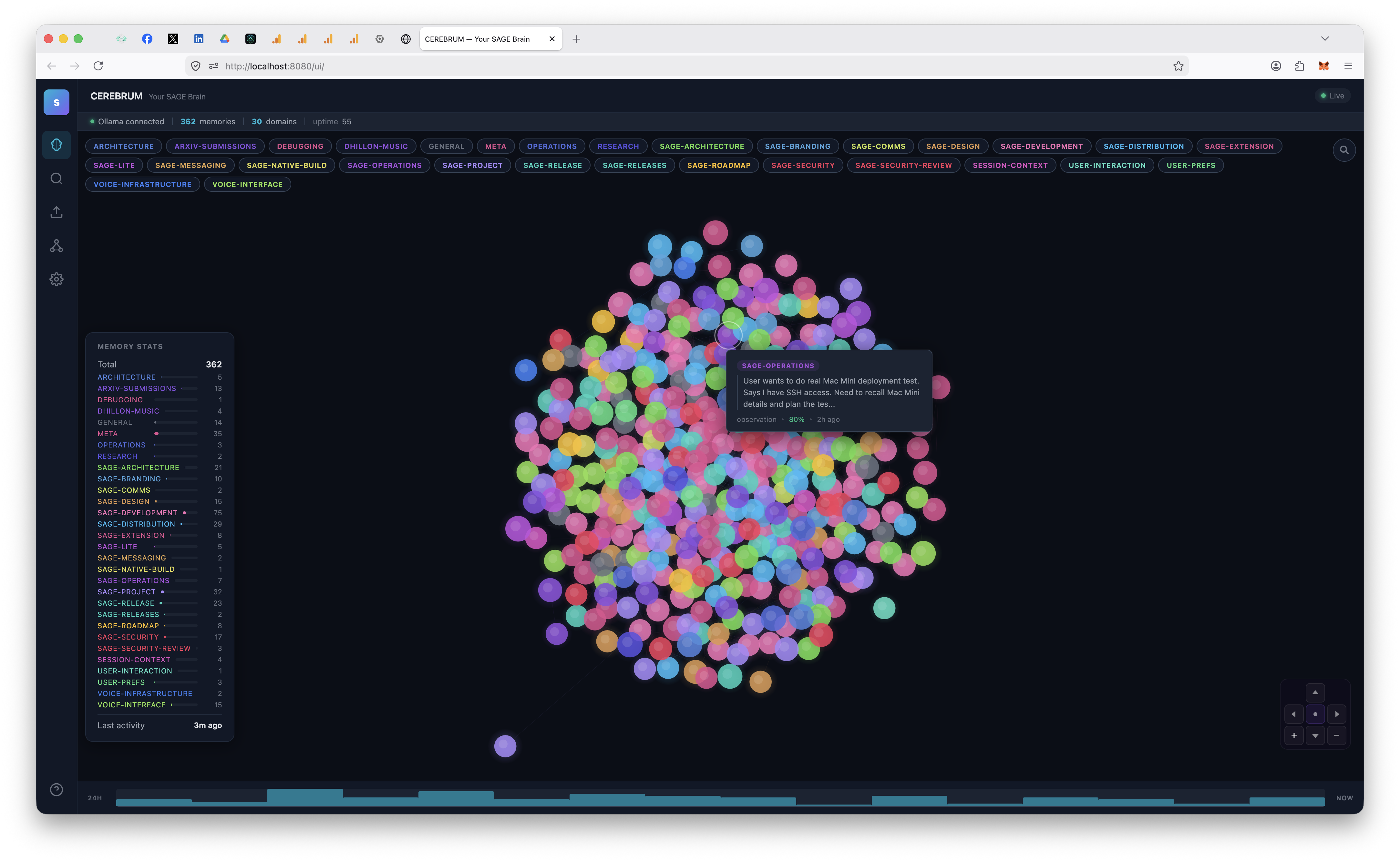
CEREBRUM Dashboard

Visualises memory as a force-directed graph. Search and filter by domain, type, or agent.

Chat History Import

Import from ChatGPT, Claude, or Gemini. Seed your AI’s memory from existing conversation history.

One-Click Updates

Built-in auto-updater checks releases, downloads, and replaces — all from the dashboard.

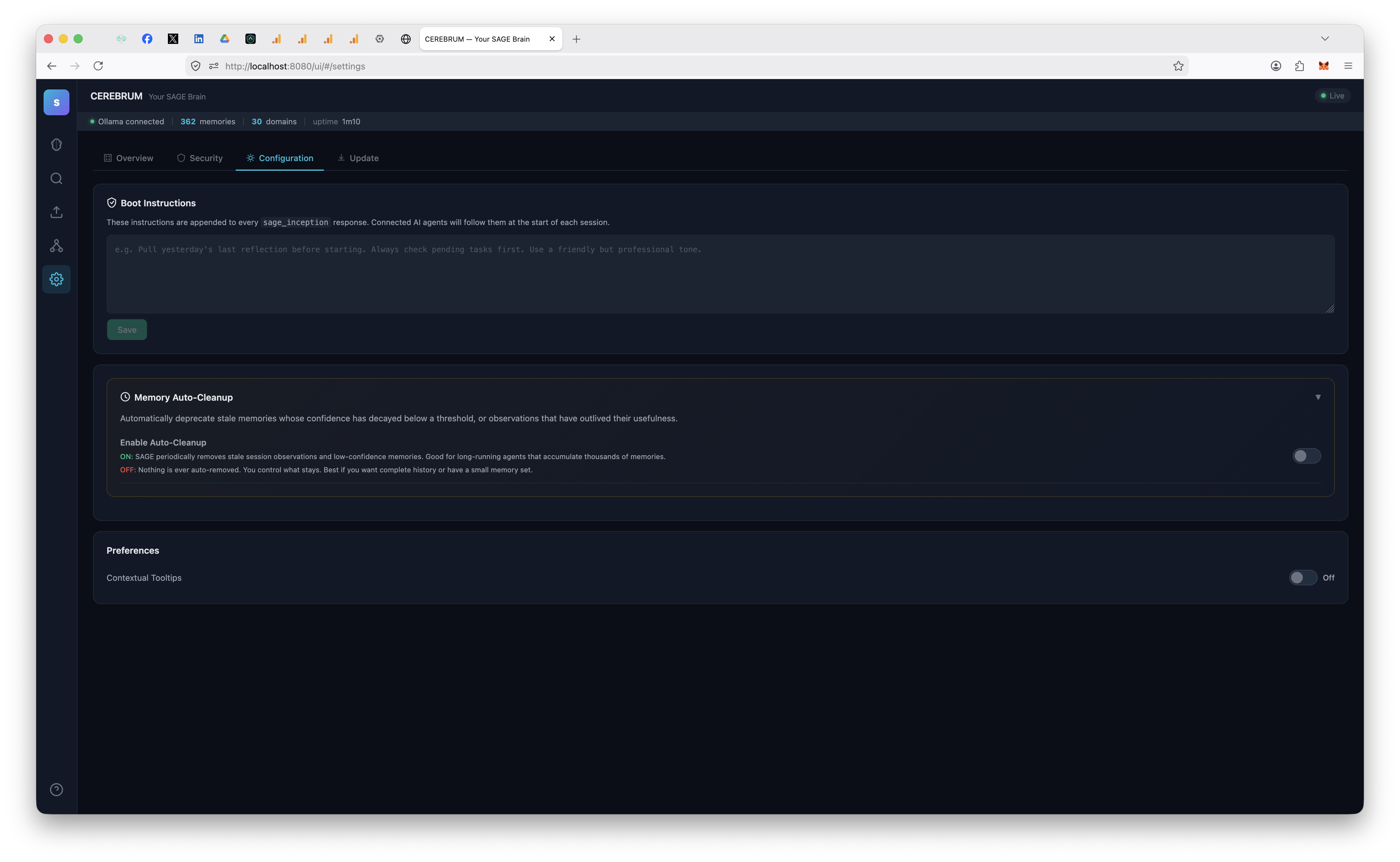
Boot Instructions

Customise startup behaviour. Configured from the dashboard; no config files to edit.

Fully Inspectable

Standard SQLite database. Open it with any tool, query it, back it up. You own every byte.

Agent Pipeline

Route work between AI agents. Send research to one model, analysis to another, results back to your primary — all through SAGE.

Auto-Journal

Pipeline exchanges are summarised as memories automatically. Full audit trail of inter-agent work without storing bulky payloads.

See it in action

CEREBRUM
CEREBRUM
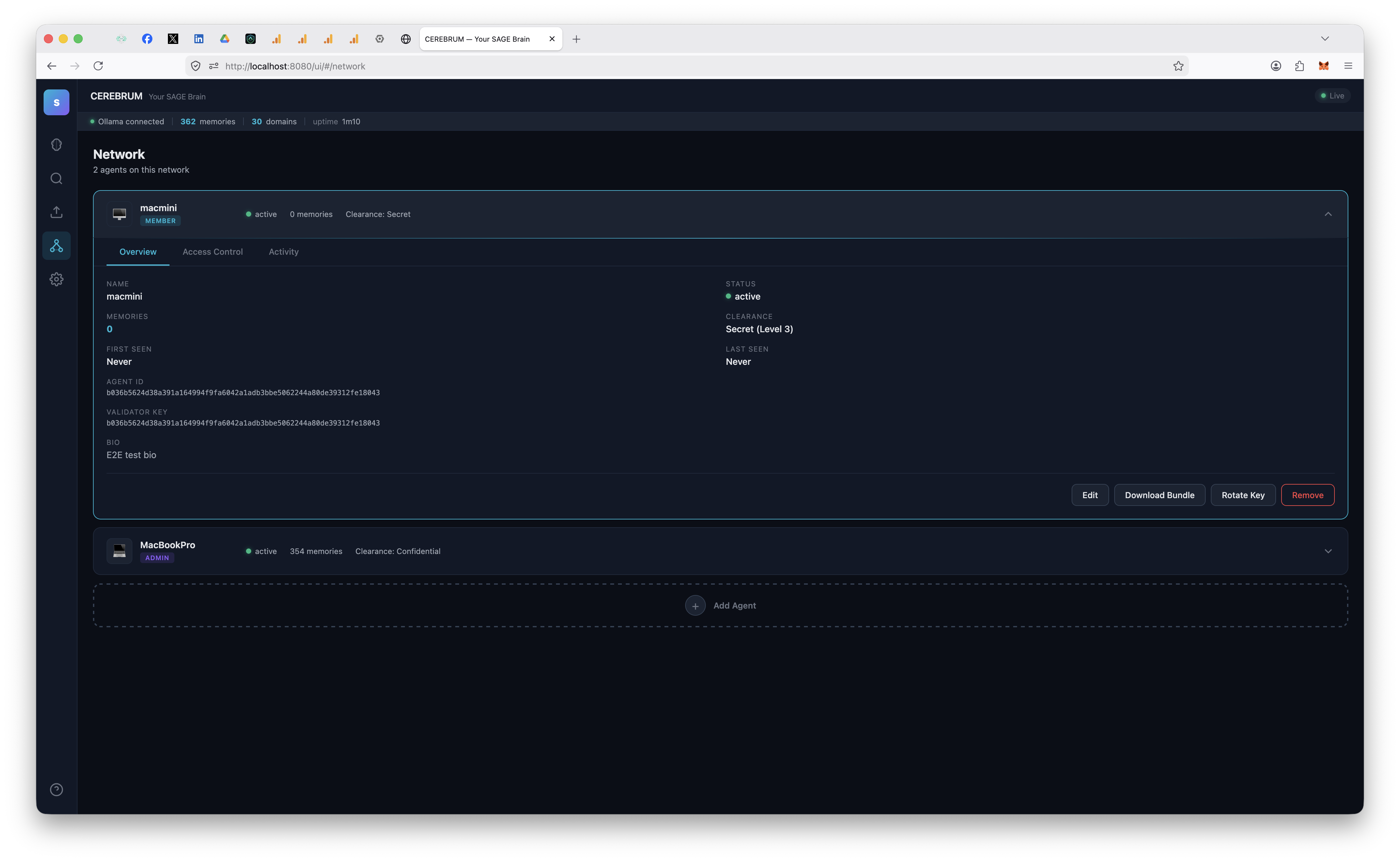
Network
Network
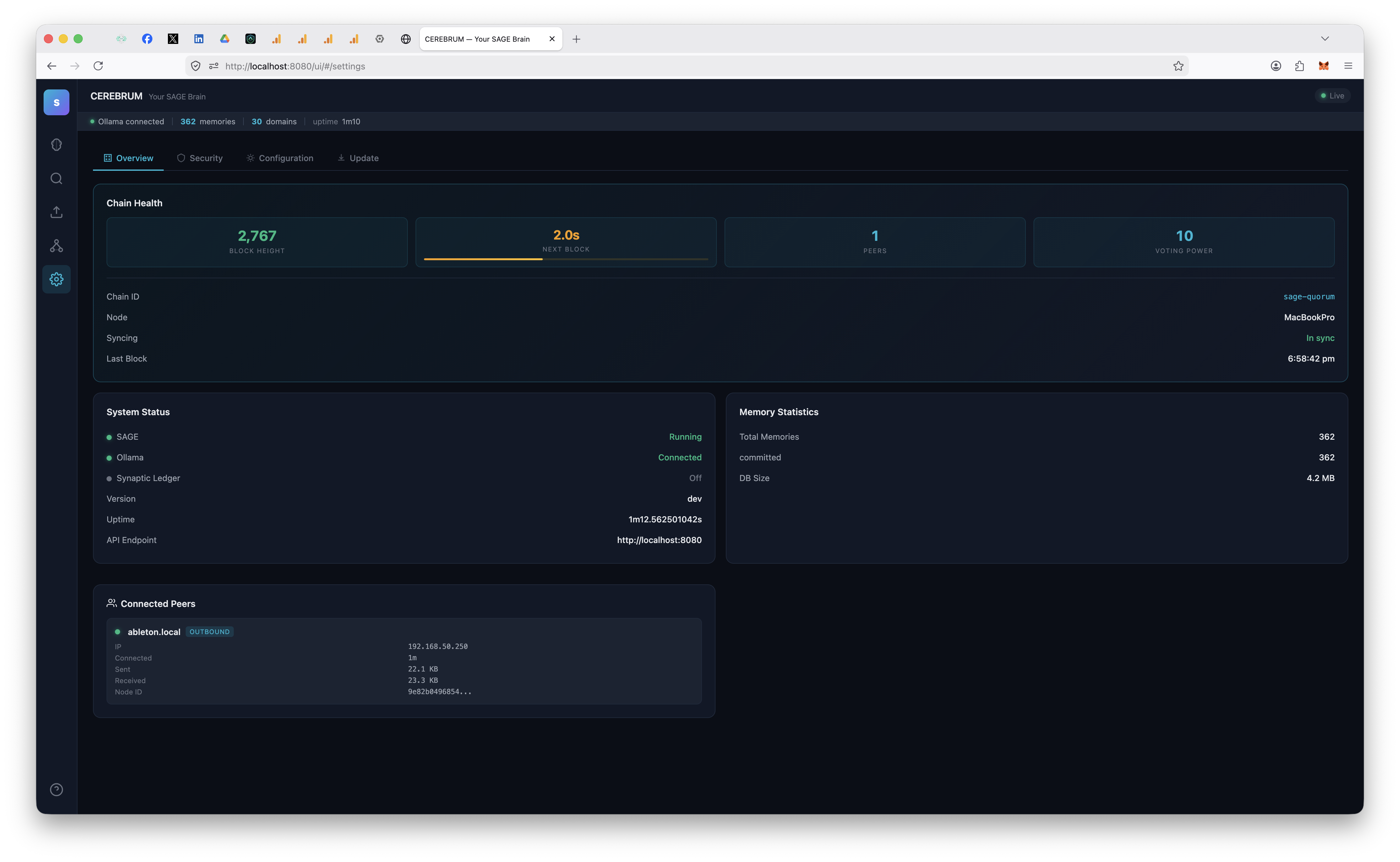
Overview
Overview
Security
Security
Configuration
Configuration
Update
Update

Three steps to get started

Install SAGE, paste the config into your AI client, and start working. Memory builds automatically across sessions.

01

Install SAGE

Download for macOS or Windows. Double-click to install. Signed and notarized.

02

Connect Your AI

The setup wizard generates MCP config for your AI — Claude, ChatGPT, DeepSeek, Gemini, Cursor, or any MCP tool.

03

Use Your AI

Your AI uses memory tools automatically. Projects, preferences, decisions — persisted across every session.

Connecting ChatGPT

ChatGPT does not speak the same MCP protocol as Claude, Cursor, and Cline. SAGE ships an OAuth-based connector and a guided 6-step setup wizard that handles the tunnel, OAuth flow, and token issuance for you. A separate browser-extension path is available for users who prefer not to expose SAGE over a tunnel.

Take your memories
with you

Changing AI providers shouldn't mean starting from zero. SAGE is model-agnostic — your data belongs to you.

From ChatGPT

Export conversations from OpenAI, then import into SAGE.

  1. 1Settings → Data Controls → Export
  2. 2Download the ZIP from OpenAI’s email
  3. 3CEREBRUM → Import → drop ZIP

From Claude

Export Claude.ai conversations and import them.

  1. 1Settings → Privacy → Export
  2. 2Download Anthropic’s export file
  3. 3CEREBRUM → Import → drop file

From Gemini

Export via Google Takeout and import.

  1. 1Takeout → Gemini Apps
  2. 2Download the archive
  3. 3CEREBRUM → Import → drop JSON
Your data stays yours. The import runs entirely on your machine. Nothing is uploaded anywhere.

Build your private
AI network

SAGE starts as one brain. When you need a team — across machines, family members, or an entire org — add agents from the dashboard.

Agent Management

Add, configure, and manage agents from the dashboard. Each gets its own signing keys, identity, role, and permissions.

Domain Access Control

Per-domain read/write permissions with a visual matrix. Five clearance tiers from Guest to Top Secret.

Per-Project Identity

Each project folder receives its own Ed25519 keypair automatically. No shared keys, no manual setup. One CLI command claims a pre-configured identity.

Key Rotation

Rotate agent keys with one click. All memories re-attributed atomically. Old keys permanently retired.

Redeployment Orchestrator

Nine-phase state machine handles chain redeployment. Backups at every phase, automatic rollback on failure.

Agent Attribution

Every memory tracks which agent created it. Admin agents are marked in the dashboard. Filter the brain view by agent.

One command.
Fully configured.

Create an agent in the dashboard with name, role, and RBAC permissions. Get a one-liner. Run it in your project folder. The agent claims its pre-configured identity automatically.

01

Create in Dashboard

Add an agent with name, role, clearance level, and domain permissions. The dashboard generates a claim token.

02

Run the Install

sage-gui mcp install --token XXXX
Run this in the project folder where your AI works.

03

Identity Claimed

The agent connects with the correct identity, role, and RBAC on its next session. Everything goes through the chain.

100% dashboard-driven. Generate signing keys, configure permissions, rotate credentials — all from the CEREBRUM dashboard. No CLI commands, no config files, no SSH. Click “Add Agent”, run the install command, done.

Agents that learn from
experience, not instructions

AI agents with persistent memory get measurably better over time. Without memory, they show essentially zero improvement no matter how many sessions you run.

Retrieval benchmarks. SAGE on LongMemEval-S (Wu et al., ICLR 2025, 500 questions): R@5 = 0.8927, R@10 = 0.9461, MRR = 0.8842. On LoCoMo (Maharana et al., ACL 2024, 1986 questions): R@5 = 0.6394, Hit@5 = 0.6954; scored via mem0's published LLM-judge harness: 0.7656. Every write through full BFT consensus. The hybrid recall stack that produced these numbers ships unchanged in v8.0. Reproducers in bench/.

Infrastructure,
not a library

SAGE isn't an API you call. It's memory infrastructure — a local server your AI connects to via MCP. Build from source or use the Python SDK.

terminal
# Clone and build
$ git clone https://github.com/l33tdawg/sage.git && cd sage
$ go build -o sage-gui ./cmd/sage-gui/
 
# Setup wizard (opens browser, generates MCP config)
$ ./sage-gui setup
 
# Start SAGE
$ ./sage-gui serve
SAGE ready
  Dashboard: http://localhost:8080/ui/
 
# Or use the Python SDK
$ pip install sage-sdk
Go 1.24+
Python SDK
SQLite embedded
MCP protocol
REST API
Apache 2.0

Your data never
leaves your machine

Most “memory plugins” send your conversations to servers. SAGE runs entirely local. A SQLite file in your home directory.

100% Local

No cloud accounts. No telemetry. Memories live in ~/.sage/ and nowhere else.

Fully Inspectable

Standard SQLite. Open it with any tool, query it, back it up, move it.

Tamper-Evident

Every memory is digitally signed with your local key. Full audit trail.

AES-256 Encrypted at Rest

Optional encryption for the memory vault. If your machine is stolen, the on-disk memories remain unreadable.

Scales to enterprise. SAGE is the single-node edition. Add agents from the dashboard for multi-agent networks, or deploy full multi-validator BFT consensus. Same codebase, same API. See the Architecture Guide.